



Position above your competition
Google My Business and geolocalization are increasingly important, especially at retail and service level. The powerful Google Maps tool is a little more powerful every day and will be more and more complete (and more difficult). Few companies currently have a profile at My Business, so competition is growing and the challenge to highlight above others is also growing. What can I do to make my business more visible? What can I do to be first in search results? The algorithm to place the different My Business profiles has its secrets and we’ll reveal some… What’s the order criterion of the reviews? How to get my company’s profile to appear first at My Business’s searches? How to invite customers to give me a review at My Business? How to make a 360º photo for My Business for free? Can I remove negative comments from my profile?
INDICE
- What’s the order of the reviews?
- How do I get my company’s profile to appear first at My Business’s searches?
- How to invite customers to give me a review at My Business?
- How to make a 360º photo for My Business for free?
- Can I remove negative comments from my profile or from other profiles?
1. What’s the order of the reviews?
No single criterion for the order of the reviews. If your profile has many client reviews, you will see that the order they are presented with isn’t purely chronological and depending on the number of stars, what factors does Google use to determine that reviews are higher and what are lower? The value of the person that writes: if the user who has leave you his review is very active at My business and thus accustomed to leave reviews at the locations where he goes, his review is more likely to be up. The chronology: If the review is more recent, it also has more points to place itself above. The timming between one review and the other: Google wants there to be no traps in the ratings of businesses, so if for a short period of time there are many reviews, Google can consider that they have been cheated and send those reviews to the tail or even remove them. The type of comment: if the review is simple or there are several that have the same lexic structure, Google will consider them to be invalid. All these are some of the factors that have been involved with the algorithm, but Google doesn’t reveal the exact weight and makes regular modifications, so the best choice is that the reviews are as natural and true as possible.
2. How do I get my company’s profile to appear first at My Business’s searches?
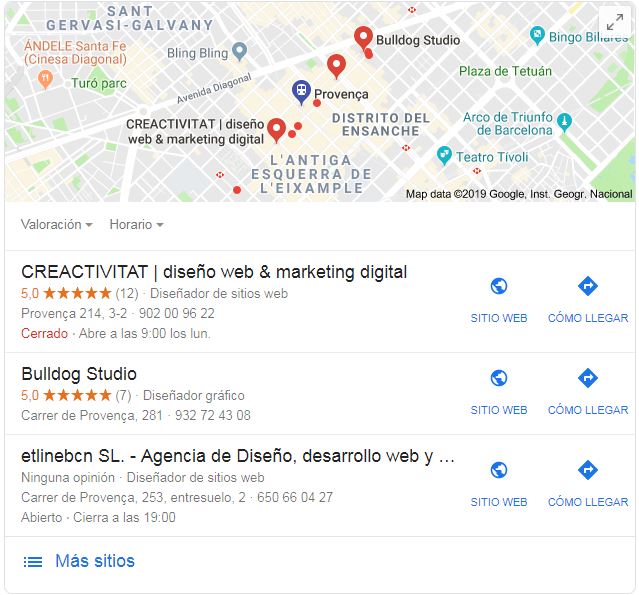
To get your profile out at first place in the map box there are also several factors that have an influence. Geolocalization: The local SEO works this way. If a user is closer to your official company address, you are more likely to get a good place. The category; you have to choose the category that most users can give you, it’s important to conduct a keyword study earlier. Number and quality of reviews: if you have more reviews and more quality than your competition, your profile will come out before yours. Profile optimization: The profile has to have all the data, opening times, images, direction, etc. Web design adapted to local public: it’s nothing to optimize a profile if your web isn’t going to offer valuable content to the user if you have access to it through the tab. The web design of the target page should be relevant to the tab at Google Maps. Palabras clave: keywords may be inside them to describe them, in the labels, in the category, in the name of the company,…
3. How to invite customers to give me a review at My Business?
To increase your profile’s number of reviews, customers have to be invited to comment. To do this, the best option is to send a direct link to comment, follow these steps to get a direct link to your comments: Search your company by name at Google. Your My Business profile will come up on the right. Click on the link where your customers’ reviews are. The screen will come up with your customers’ reviews. Click the top to right “Write an Review” button. A little pantyhose will come up and write your review and copies the URL that goes out into your browser. The URL will be very long, we recommend using tools such as Bitly https: / / bitly.com / that will shorten it. Remember not to send the link to a massive extent. If you have a lot of reviews in a short period of time, Google will play that you have been cheating and will hurt you.
4. How to make a 360º photo for My Business for free?
The 360º photos give a spectacular vision of the spaces, whether they are office, tent or large surfaces. Until a while ago we had to hire a professional photographer to conduct the photos, but this has been changed with the Google Street View app. Take down the app and follow the following steps: Click the camera icon at the bottom right. Select “Camera” mode and follow the instructions for performing the 360º Touch Select image in “Private.” Choose the photo you want to publish and if you want to apply the Fancy Touch uploaded from files and To publish Your photo will be shown in “Profile.”
5. Can I remove negative comments from my profile or from other profiles?
Negative comments cannot be deleted, but they can be managed. On the one hand, if it’s an offensive message or that doesn’t meet Google’s conditions, it can be marked as an “inappropriate message.” To do this you have to get into the viewing part of the reviews and put the mouse next to the stars, and there appears a small flag that will allow you to report the comment. Google will have final authority to remove or do not comment. Élia Vives Marketing Department
Èlia Vives
Marketing Department